

Mobile Game | Tower Defence | Strategy
Concept
Development time - 5 Weeks
Neon Fusion TD is a tower defense game packed with fun and strategic action, available for download on the Google Play Store.
The player must prevent a virus from spreading through a mystic cyber world by placing turrets to protect the system. Tactical thinking and smart placement are essential for success, and effective resource management is highly rewarded.
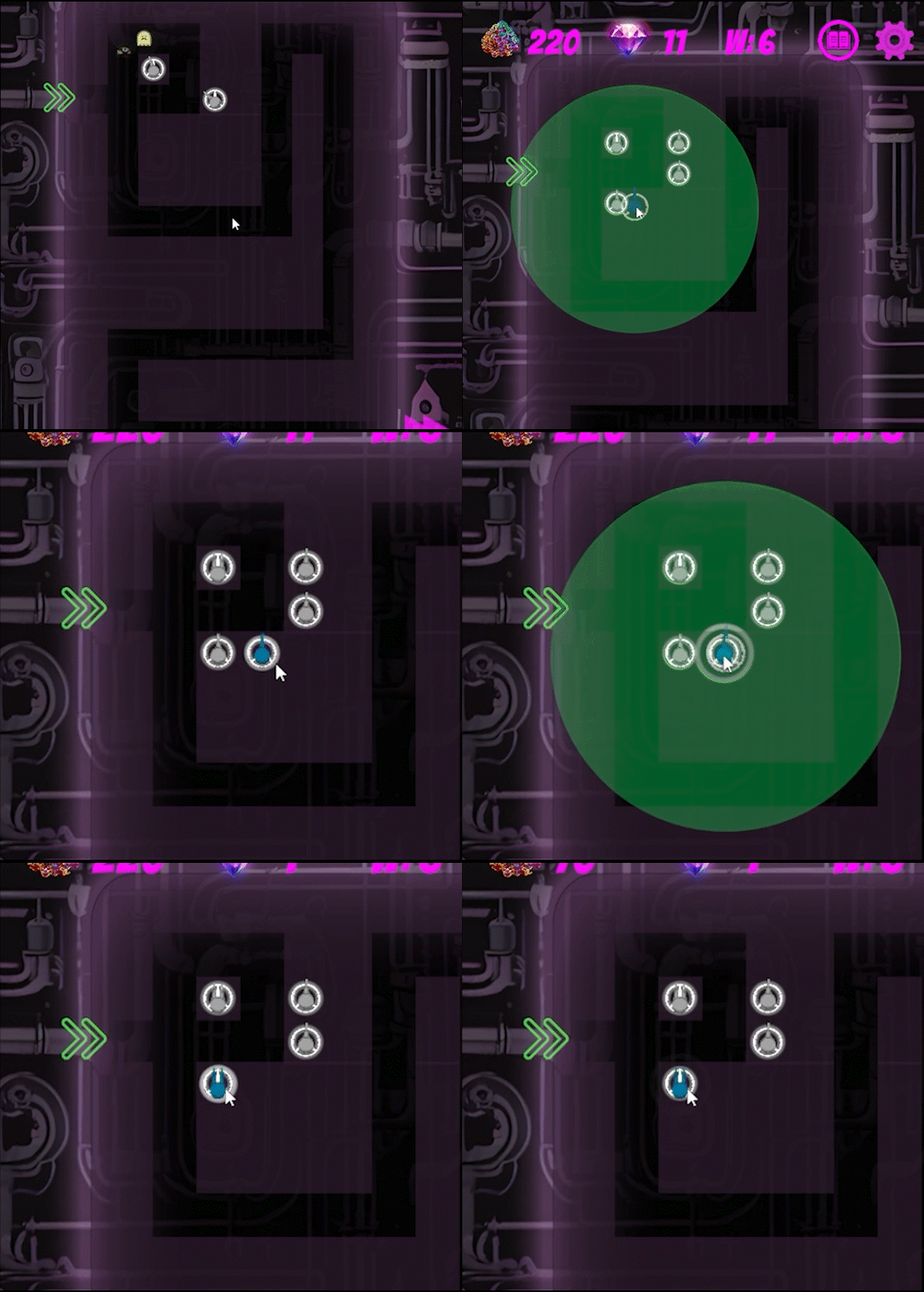
To strengthen their defenses, players are encouraged to merge towers to upgrade them, a feature that sets the game apart from other tower defense titles. Instead of traditional upgrades, all tower types can be combined, creating new variations and fusing their elements into more complex and powerful weapons.
We wanted the game to gradually increase in difficulty, with players facing a variety of enemies and challenging bosses to keep gameplay engaging and fresh. Maintaining strong performance was also a top priority, as the game is designed for mobile devices.
Full Game
Main Contribution
Tower handling & Shop system
First experience designing an interactive in-game purchasing system.
Responsive Design
First time adapting a game and its UI to support a wide range of aspect ratios.
Save & Load
Developed a system to save and load a game using JSON.
My Role
As a programmer of Neon Fusion TD, I was responsible for implementing the core systems of the game, including the tower placement mechanics, shop system with drag-and-drop functionality, save/load system using JSON, and dynamic UI scaling for various devices.
Beyond programming, I also contributed to game design, created custom graphics and animations, composed and mixed sound effects, and handled user interface design. I was actively involved in bug fixing and playtesting to ensure a balanced and polished experience.

Tower handling & Shop System
GamePlay
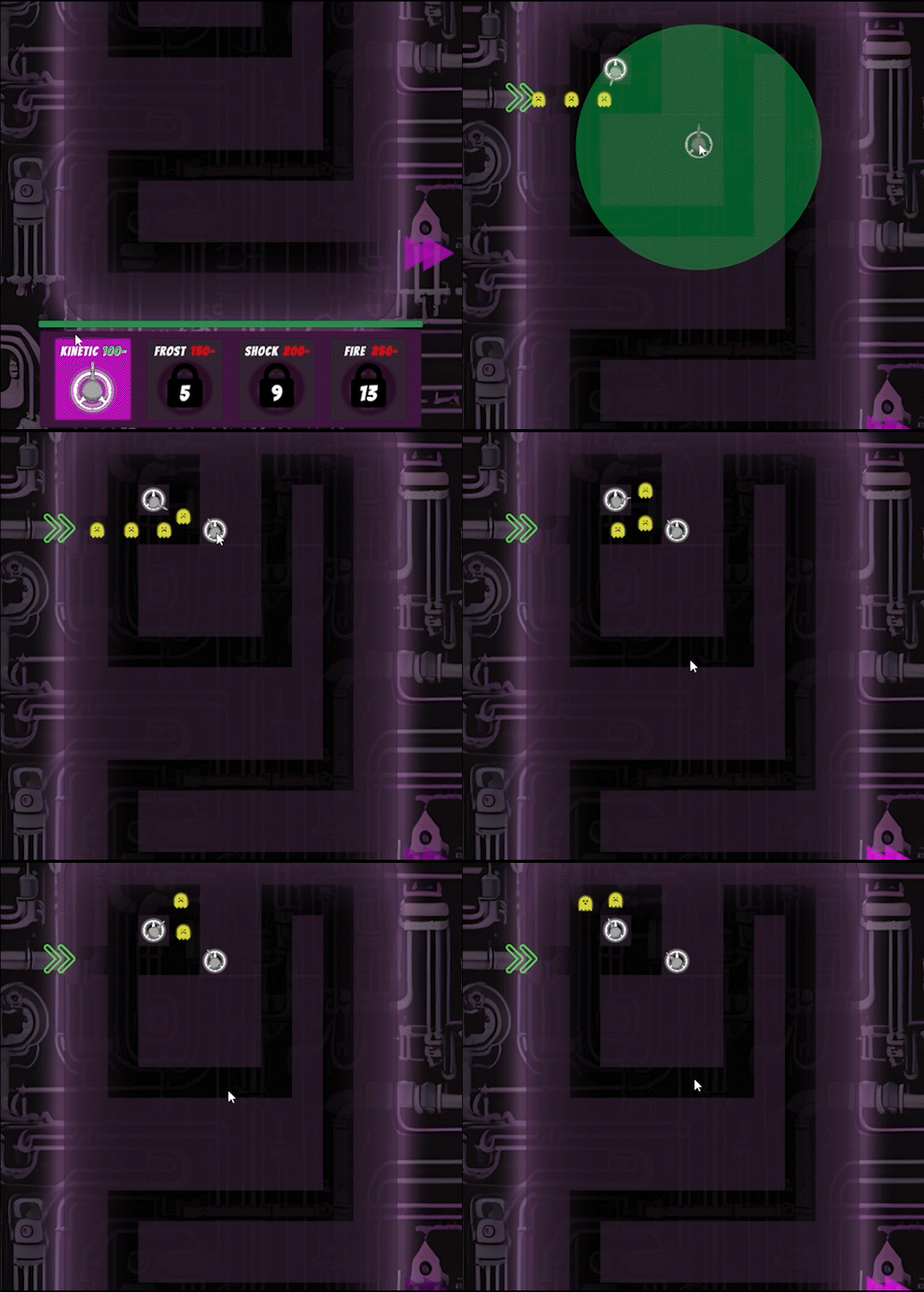
Placing Tower
Merging Towers
Goal
My goal was to create a highly interactive and strategic tower defense experience where the player’s tactical choices truly influence the outcome of each game. A common drawback in traditional tower defense games is that the player can become too passive after placing their defenses.
I wanted to avoid that by encouraging constant decision-making and involvement. To support this, we aimed to give players more control during and between waves, and to present game mechanics in a gradual, non-overwhelming way that keeps players engaged and learning without feeling lost.
Solution
I designed a system that lets players freely reposition towers between waves, giving them the chance to adjust their strategy as new enemies appear. This keeps gameplay dynamic and engaging. The shop is easily accessible and built to feel satisfying, using a drag-and-drop system that allows intuitive tower placement. Clear visual indicators and responsive UI, like color changes and lock icons, guide the player and make it obvious what actions are available.
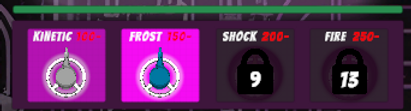
To avoid overwhelming the player, new towers and mechanics are introduced gradually. Elements unlock with wave progression, while the resource system scales to support experimentation with the new tools.
Implementation
The game board was built using a grid system, where each tile can hold a single tower. A visual indicator appears when dragging a tower, showing whether placement or merging is possible, both when buying from the shop and when moving towers already on the board. This is handled using raycasts from the pointer position to detect valid tile targets and determine if the space is free or if a merge action can be performed.
Shop items are enabled dynamically based on the current wave and the player’s available resources, ensuring that only valid choices are interactable at any given time. This system helps guide the player while keeping the interface responsive and clear.


Reflection & Learnings
One key lesson from this feature was understanding how crucial it is to carefully read documentation when working with built-in engine functionality. At first, I used Unity’s built-in On-Mouse-Click system, but it turned out to be too limited, it could only handle one object at a time and couldn't detect objects behind UI layers due to how it handled raycasts.
To solve this, I built a custom solution using extended raycasting logic. By switching to Physics.RaycastNonAlloc, I was able to detect objects even if others were layered in front of them, something the default system struggled with. While my main reason for using it was to improve hit detection accuracy, I also learned that RaycastNonAlloc helps optimize performance by avoiding unnecessary memory allocations, since it writes results into a pre-allocated array.
This feature also strengthened my debugging skills. Since the project required collaboration and bug-fixing in both my own and others’ systems, I developed a more structured approach. I found it helpful to isolate bugs with minimal debug logs and then trace variable states across scripts. Approaching others’ code with curiosity rather than assumptions allowed me to fix issues without introducing new ones.
Responsive Design
Goal
The aim was to create a responsive user interface that works seamlessly across the wide range of screen sizes and formats found on mobile devices.
We wanted the layout to remain readable, accessible, and visually balanced, no matter the device, to ensure a smooth gameplay experience.
Solution
To achieve this, we developed a system that adjusts the placement and scale of key UI elements based on the screen’s aspect ratio.
Instead of relying on fixed layouts, the interface dynamically adapts at runtime to maintain consistency and usability, while also preserving the intended visual hierarchy.
Implementation
The system runs on startup and calculates the device's aspect ratio to determine which layout adjustments to apply.
These adjustments modify the position and scale of UI components, such as the shop, health bar, and action buttons, using predefined values.
Many of these changes are applied through multipliers or percentage-based calculations to fit different screen proportions smoothly, avoiding overlaps or misalignment.
Tablet

Phone

Reflection & Learnings
This feature taught me just how essential dynamic and responsive design is when developing for mobile platforms. With the sheer number of resolutions and screen formats available, relying on fixed values quickly leads to inconsistent layouts. By working with percentage-based positioning and scaling instead, I learned how to create UI systems that are both flexible and consistent across devices

Save & Load
Goal
To support progression, experimentation and replayability, we needed a system to save and load the player's current game state.
The goal was to persist key gameplay data, such as wave progress, resources, tower positions, and unlocks, so players could return to their session seamlessly, even after closing the app.
Solution
We implemented a data persistence system using JSON serialization, allowing game data to be saved locally and reloaded when the game starts.
By using a modular interface, all relevant systems could push and pull their own data to and from a central manager, ensuring consistency and scalability across the project.
Implementation
The save system is structured around a centralized manager that coordinates all parts of the game that need to store or retrieve data. When the game starts, it automatically identifies relevant components and provides them with saved data. When saving, those same components feed their current state into a shared data object, which is then serialized and written to a local file. This modular approach allows each system, such as towers, resources, or player progress, to handle only its own data, while the save system handles the overall structure and storage.
Reflection & Learnings
A key takeaway was discovering that Unity’s built-in JSON system doesn’t support dictionaries. To solve this, I built a custom SerializableDictionary class, which allowed us to store complex data like turret identities, positions, and unlock states. This experience taught me the value of understanding serialization limits early and building flexible systems that match a project’s data needs.
Serialisation methods


Graphics & Animation
Goal
The goal was to build a visual identity and feedback system that supported both usability and immersion. In a tower defense game, the interface and animations play a key role in communicating game states quickly and clearly.
I focused on creating visual systems and UI elements that enhance gameplay clarity and reinforce player actions, while also contributing to the overall visual presentation.
Solution
My contributions to the visual design focused primarily on gameplay-relevant UI and feedback systems. I created sprites and visual assets such as tilemaps, backgrounds, buttons, animated pop-ups, and resource counters.
These were paired with scripted feedback systems, like dynamic color changes, placement indicators, and achievement animations, to ensure the visuals responded directly to player interactions.

Visual Feedback
Board & UI Design

Implementation
I implemented a wave-based achievement system that displays visual pop-ups and audio cues every 5 rounds, scaling infinitely as the player progresses. This was done through a logic-driven structure that listens for game state changes and updates the UI accordingly. I also created systems for dynamically coloring UI elements like the shop and currency text based on the player’s available resources, as well as indicators that highlight valid or locked tower placements.
Also, several custom visual elements, including merge effects, tower selection previews, and shooting range indicators, were integrated through code to respond in real time to the player’s actions and game conditions.
Reflection & Learnings
This part of the project taught me how to bridge visual design and interactive feedback in a meaningful way. While I didn’t create all graphical assets, I was responsible for designing and integrating many of the UI elements and animations directly tied to gameplay. A major takeaway was learning to design visual logic that scales with the game, like an achievement system that can handle infinite waves, and how to deliver clear, dynamic feedback through both visuals and sound. It gave me valuable experience in combining design thinking with programmatic control to support player engagement.
Achievement System
